Introduction
In this blog we are discussing about RHV 4.0 Installation and administration topics. RHV 4.0 is the RedHat Enterprise Virtualization solution, which is based on oVirt project [open-source Virtualization project]. It is an enterprise-grade server and desktop virtualization platform built on Red Hat Enterprise Linux that offering infrastructure which is optimized for server and desktop virtualization.
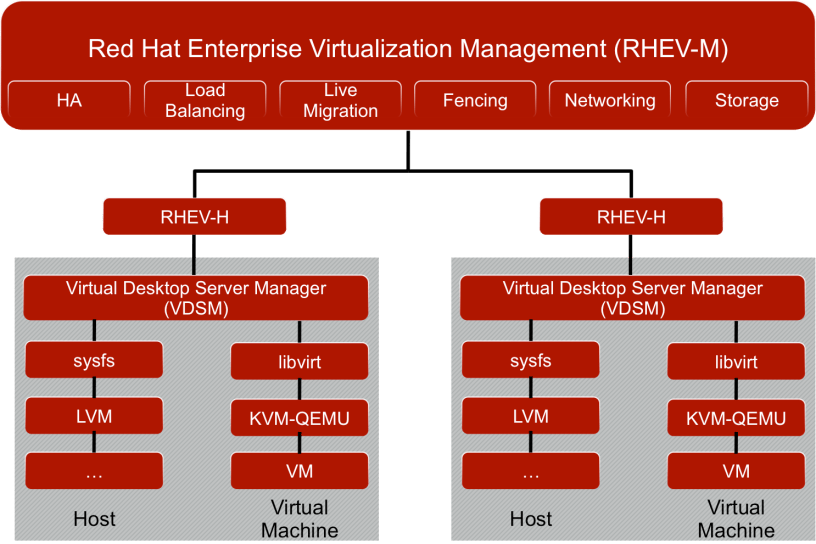
RHV has two main components: RHV-H and RHV-M. Red Hat Virtualization Hypervisor (RHV-H) is a full-featured virtualization platform built from only a subset of RHEL components plus the Kernel Based Virtual Machine (KVM) which is used as a resource pool for RHV.
Red Hat Virtualization Management (RHV-M) is a virtual management console built on Red Hat Enterprise Linux (RHEL). It interacts with individual RHV-H nodes using the Virtual Desktop Server Manager (VDSM). A VDSM agent is running on each of the RHV-H nodes.
RHV-M allows administrators to manage multiple data centres and their network, compute and storage resources. In addition, RHV-M provides a central repository for storing virtual machines, disks, images and virtual machine snapshots.
Prerequisites
- Four PC’s. 1 PC for RHV Management Server, 1 PC for Util server to handle specific services and two hypervisors servers (RAM >= 4 B)
- Redhat RHV Active trail subscription to download packages and installed via offline.
System Deployment Architecture:-
will be updated soon!!!!
System Requirements:
RHV Management :- RHEL 7.X Operating System and RAM >= 8GB
UTIL Server :- CentOS 7.X operating System and RAM >= 2GB
Hypervisors :- RHVH-4.x and RAM >=4GB
1) Download the RHV 4 Latest Packages on Management Server. Hope you have installed RHEL 7 OS.
1.1 Activate the subscription . I hope RHV 4 was subscribed in the Redhat UI.
#Activate the subscription in the UI by browsing following site, accept
terms and conditions.
https://access.redhat.com/products/red-hat-virtualization/evaluation
#active the subscription:
subscription-manager register#//it will ask the Red Hat Channel user name
and password to type//
#subscription-manager list --available
#subscription-manager attach --pool=   #//pool id can be get from
previous command output//#
#Once System registered, enable the repos
yum repolist all
subscription-manager repos --enable=rhel-7-server-rpms
subscription-manager repos --enable=rhel-7-server-supplementary-rpms
subscription-manager repos --enable=rhel-7-server-rhv-4.0-rpms
subscription-manager repos --enable=jb-eap-7-for-rhel-7-server-rpms
#Download below script and run it in background:
./rhevm-offline-install-4_0_4.sh &&
rhevm-offline-install-4_0_4 :- This is the script file attached as PDF format, renamed to .sh file when execute. The user name and password to be updated in the script file.
 sysimplementationtech